Tiered Bundle Builder with Live Discount Feedback
Built an interactive bundle builder where shoppers add products to a set and see their discount tier update live. Implemented the Liquid section, cart-quantity logic, and tiered discount messaging tied to Shopify's native discount functions.
The merchant wanted to reward shoppers for buying multiple products at once, but the store had no way to communicate progressive savings before checkout. Shoppers would add items individually with no visibility into how close they were to unlocking a better discount, which meant the incentive wasn't doing its job at the moment it mattered most: the product page.
Build a bundle builder where shoppers pick from an eligible product set, see a running item count, and get live feedback on which discount tier they're in (e.g. 3 items = 15% off, 4 items = 20% off, 6+ items = 25% off) before they ever reach checkout.
I built the frontend: the Liquid section for the bundle builder UI, the JavaScript that tracks selected items and recalculates the active tier in real time, and the styling for tier progress states. Tier discount amounts were configured through Shopify's native discount functions on the backend, which I integrated against but did not build myself.
Technologies: Shopify Liquid, Vanilla JavaScript (ES2020), Shopify Cart AJAX API, Shopify Functions (discount integration), CSS custom properties, Dawn theme (base).
The bundle builder renders as a Liquid section pulling from a curated product list, set by the merchant through a metafield-linked collection. Each product has an add/remove control that updates a local JavaScript state object tracking selected item count.
As items are added or removed, a small tier-progress bar updates instantly, showing shoppers which discount threshold they're currently in and how many more items would unlock the next tier. This calculation happens entirely client-side for instant feedback, with the actual discount applied server-side through Shopify's discount function once the cart is updated, so the displayed tier always matches what happens at checkout.
I added a debounce on the cart-update call so rapid add/remove clicks don't fire multiple redundant network requests, which mattered once the merchant's product set grew past a dozen items.
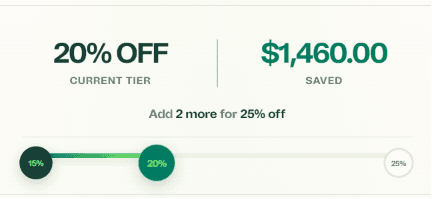
The bundle builder mid-selection, showing four items added, the active 20%-off tier highlighted, and the "add one more to unlock 25% off" prompt.
JavaScript: tier calculation
function getActiveTier(itemCount, tiers) {
  return tiers
    .filter(tier => itemCount >= tier.minItems)
    .sort((a, b) => b.minItems - a.minItems)[0] || null;
}The challenge
Client-side tier calculation and the server-side discount function occasionally disagreed at the boundary. A shopper could see "20% off" in the builder UI, but the actual discount function evaluated cart contents slightly differently at checkout, causing a mismatch.
The solution
I mirrored the exact tier thresholds and rounding logic from the discount function's configuration into the frontend calculation, rather than approximating it, and added an inline note clarifying the displayed tier reflects the same thresholds applied at checkout. This removed the discrepancy without needing to change the discount function itself.
Shoppers can now narrow a collection by material, size, or use case without leaving the page or waiting on a full reload. The merchant manages every filter option directly from the Shopify admin, adding or renaming values as the catalog changes, with no code changes and no dependency on a third-party app. Removing that app also meant one less script loading on every collection page.
Structured content only pays off if every optional field is actually treated as optional in the template. Assuming a field will always be filled in is what turns a flexible content model into a fragile one.
If you're running tiered pricing or bundle promotions and want shoppers to see their savings update live instead of guessing at checkout, that's the kind of feature I can build directly into your theme.