Cart-Threshold Gift Selector
Built a cart drawer widget that reveals free gift options as spend thresholds are reached. Implemented the live cart-total watcher, conditional gift-grid UI, and Liquid section pulling eligible gifts from a metafield list.
The merchant wanted to reward shoppers for hitting specific spend thresholds (e.g. $50, $90) with a free gift, but needed shoppers to actually notice and pick a gift inside the cart drawer rather than missing the offer entirely. A static banner wasn't enough. Shoppers needed to see their progress toward the next threshold and choose from eligible gifts without leaving the cart.
Build a cart drawer experience where the gift selector activates automatically as cart total crosses each threshold, shows shoppers which threshold they have hit, and lets them pick one gift per tier from a merchant-managed list, all without a page reload.
I built the frontend: the cart-total watcher in JavaScript, the conditional display logic for each gift tier, the gift-selection grid UI in the cart drawer, and the Liquid section that renders eligible gifts from a metafield-defined list. Discount/free-item logic on the order itself was applied through Shopify's native cart and discount tooling, which I integrated against but did not configure myself.
Technologies: Shopify Liquid, Vanilla JavaScript (ES2020), Shopify Cart AJAX API, Product metafields, CSS custom properties, Dawn theme (base).
The gift tiers and their eligible products are defined through a metafield list the merchant manages from the admin, so adding a new threshold or swapping which products count as gifts does not require a code change.
A JavaScript listener watches the cart subtotal on every cart update (add, remove, quantity change) and compares it against the configured thresholds. When a threshold is crossed, the corresponding gift tier activates in the cart drawer with a short transition, and a grid of eligible gift products appears for that tier, letting the shopper pick one.
Selecting a gift adds it to the cart as a $0 line item through the Cart API, tagged so it is identifiable as a promotional gift rather than a purchased item. If the shopper's total later drops below a threshold (e.g. after removing an item), the corresponding gift is automatically removed from the cart to prevent an ineligible free item at checkout.
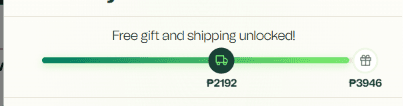
The cart drawer with the $50 gift tier active, showing the gift-selection grid and a progress indicator toward the $90 tier.
JavaScript: threshold check and gift sync
function syncGiftTiers(cartTotal, tiers, cart) {
  tiers.forEach(tier => {
    const eligible = cartTotal >= tier.threshold;
    const giftInCart = cart.items.find(item => item.properties?._gift_tier === tier.id);

    if (eligible && !giftInCart) {
      activateGiftTier(tier);
    } else if (!eligible && giftInCart) {
      removeGiftFromCart(giftInCart);
    }
  });
}The challenge
Shoppers could add a gift, then remove a regular product to drop below the threshold, leaving a free gift in the cart the merchant never intended to honor at that order value.
The solution
I tied each gift line item to its triggering tier using a line item property, then re-ran the threshold check on every cart mutation, not just on add. If a shopper's total drops below a tier's threshold, that tier's gift is automatically removed before the cart updates, so the cart state always reflects what the shopper has actually earned.
Insert real outcome here. If you have measured metrics (e.g. average order value change, bundle conversion rate), include them. If not, describe the qualitative change: what shoppers can now see and do that they couldn't before, and how it changed the merchant's ability to run this kind of promotion.
Any feature that auto-adds something to the cart needs an equally solid auto-remove path. The failure mode that matters most isn't the happy path, it's the shopper undoing part of their order after the reward already triggered.
If you're running spend-based promotions and want gifts to activate automatically in the cart instead of relying on a shopper noticing a banner, that's the kind of cart logic I can build directly into your theme.